
Compaq ProLiant DL380 Generation 2 Setup and Installation Guide


Installing Hardware Options 3-9
Compaq Confidential – Need to Know Required
Writer: Rob Weaver Project: Compaq ProLiant DL380 Generation 2 Server Setup and Installation Guide Comments:
Part Number: 203844-001 File Name: d-ch3 Installing Hardware Options.doc Last Saved On: 4/5/01 1:55 PM
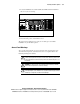
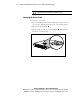
Removing the Air Baffle
A plastic air baffle directs airflow within the chassis. To perform some
hardware procedures, you need to remove the air baffle.
To remove the air baffle:
1. Remove the access panel. See the “Removing the Access Panel” section
in this chapter.
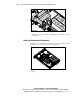
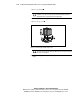
2. Lift the air baffle.
Figure 3-7. Removing the air baffle
CAUTION: Always install the air baffle after completing hardware installation or
maintenance procedures. Failure to do so results in improper airflow, which
could lead to thermal damage.
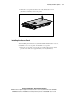
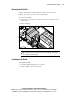
Installing the Air Baffle
To install the air baffle:
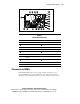
1. Align the air baffle with the processor sockets.
2. Set the air baffle onto the system board.