
Compaq ProLiant DL380 Generation 2 Setup and Installation Guide


3-6 Compaq ProLiant DL380 Generation 2 Server Setup and Installation Guide
Compaq Confidential – Need to Know Required
Writer: Rob Weaver Project: Compaq ProLiant DL380 Generation 2 Server Setup and Installation Guide Comments:
Part Number: 203844-001 File Name: d-ch3 Installing Hardware Options.doc Last Saved On: 4/5/01 1:55 PM
CAUTION: Electrostatic discharge can damage electronic components. Properly
ground yourself before beginning any installation procedure.
Removing the Access Panel
To remove the access panel:
1. If you are installing a non-hot-plug hardware option, power down the
server. See the “Powering Down the Server” section in this chapter.
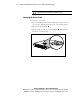
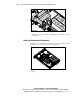
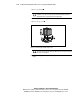
2. Flip up the hood latch handle .
3. Turn the handle one-half turn counter-clockwise . When the latch
disengages, it extends upward.
1
2
Figure 3-3. Unlocking the hood latch