
Compaq ProLiant DL380 Generation 2 Setup and Installation Guide


Installing Hardware Options 3-5
Compaq Confidential – Need to Know Required
Writer: Rob Weaver Project: Compaq ProLiant DL380 Generation 2 Server Setup and Installation Guide Comments:
Part Number: 203844-001 File Name: d-ch3 Installing Hardware Options.doc Last Saved On: 4/5/01 1:55 PM
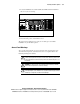
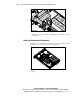
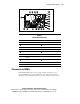
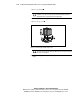
5. Locate the illuminated rear unit identification LED switch that identifies
the server you are servicing.
Figure 3-2. Locating the rear unit identification LED switch
6. Disconnect the power cords from the server.
The system is now without power, and you can safely proceed with the
installation of your hardware options.
Access Panel Warnings
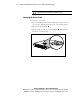
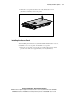
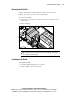
To access the system board, processors, memory slots, expansion slots, and
other internal components, you must remove the access panel. Observe the
following warnings and cautions.
WARNING: Moving your server Power On/Standby button to the standby
position removes power from most areas of the server. However, portions of the
power supply and some internal circuitry remain active until the AC power cord
is removed.
WARNING: To reduce the risk of personal injury from hot surfaces, allow the
internal system components to cool before touching.
CAUTION: Do not operate the server for extended periods without the access
panel. Operating the server without the access panel results in improper airflow
and improper cooling that can lead to thermal damage.