
Compaq ProLiant DL380 Generation 2 Setup and Installation Guide




3-4 Compaq ProLiant DL380 Generation 2 Server Setup and Installation Guide
Compaq Confidential – Need to Know Required
Writer: Rob Weaver Project: Compaq ProLiant DL380 Generation 2 Server Setup and Installation Guide Comments:
Part Number: 203844-001 File Name: d-ch3 Installing Hardware Options.doc Last Saved On: 4/5/01 1:55 PM
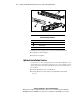
3. Press the front unit identification LED switch on the server front
panel
. Blue LEDs illuminate in the switches on the server’s front and
rear panels.
4. Press the server Power On/Standby button to place the server in standby
mode
. When the server activates standby power mode, the system
power LED turns to amber. For more information about LEDs, see
Appendix E, “LED Indicators and Switches.”
1
2
Figure 3-1. Activating the front unit identification LED switch and setting the
Power On/Standby button to the standby power mode
WARNING: Moving your server Power On/Standby button to the standby
position removes power from most areas of the server. However, portions of the
power supply and some internal circuitry remain active until the AC power cord
is removed.