
Compaq ProLiant DL380 Generation 2 Setup and Installation Guide




Planning the Server Installation 2-7
Compaq Confidential – Need to Know Required
Writer: Rob Weaver Project: Compaq ProLiant DL380 Generation 2 Server Setup and Installation Guide Comments:
Part Number: 203844-001 File Name: c-ch2 Planning the Server Installation.doc Last Saved On: 3/27/01 10:29 AM
Server Warnings and Cautions
Before installing your server, ensure you understand the following warnings
and cautions:
WARNING: To reduce the risk of personal injury from hot surfaces, allow the
drives and the internal system components to cool before touching them.
WARNING: To reduce the risk of electrical shock or damage to the equipment:
■ Do not disable the power cord grounding plug. The grounding plug is an
important safety feature.
■ Plug the power cord into a grounded (earthed) electrical outlet that is
easily accessible at all times.
■ Unplug the power cord from the power supply to disconnect power to the
equipment.
CAUTION: Protect the server from power fluctuations and temporary
interruptions with a regulating uninterruptible power supply (UPS). This device
protects the hardware from damage caused by power surges and voltage spikes
and keeps the system in operation during a power failure.
CAUTION: Do not operate the server for long periods without the access panel.
Operating the server without the access panel results in improper airflow and
improper cooling that can lead to thermal damage.
Server Shipping Contents
Unpack the server shipping carton and locate the materials and documentation
necessary for installing your server. All of the rack-mounting hardware
necessary for installing the ProLiant DL380 Generation 2 server into the rack
is included with the rack or the server.
The contents of the server shipping carton include the following:
■ Compaq ProLiant DL380 Generation 2 server
■ Hardware documentation, reference information, and software products
■ Power cord
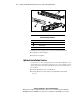
■ Rack-mounting hardware (Figure 2-2 and Table 2-1)