
Compaq ProLiant DL380 Generation 2 Setup and Installation Guide


System Battery G-3
Compaq Confidential – Need to Know Required
Writer: Rob Weaver Project: Compaq ProLiant DL380 Generation 2 Server Setup and Installation Guide Comments:
Part Number: 203844-001 File Name: p-appg System Battery.doc Last Saved On: 3/27/01 10:27 AM
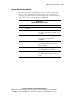
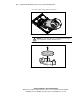
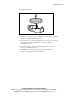
5. Install the new battery.
Figure G-3. Installing the new battery
6. Install the access panel. See the “Installing the Access Panel” section in
Chapter 3, “Installing Hardware Options.”
7. Reconnect the power cord and peripheral devices. See the “Connecting
the Power Cord and Peripheral Devices” section in Chapter 4,
“Installing the Server.”
8. Power up the server. See the “Powering Up the Server” section in
Chapter 4, “Installing the Server.”
9. Run RBSU to reconfigure the system with the new battery. See
Chapter 7, “Server Configuration and Utilities.”