
Compaq ProLiant DL380 Generation 2 Setup and Installation Guide

Compaq Confidential – Need to Know Required
Writer: Rob Weaver Project: Compaq ProLiant DL380 Generation 2 Server Setup and Installation Guide Comments:
Part Number: 203844-001 File Name: p-appg System Battery.doc Last Saved On: 3/27/01 10:27 AM
Appendix G
System Battery
The Compaq ProLiant DL380 Generation 2 server has one memory device that
requires a battery for retaining stored information.
System Board Battery Replacement
When your server no longer automatically displays the correct date and time,
you may need to replace the battery that provides power to the real-time clock.
Under normal use, battery life is usually about 5 to 10 years. Use a Compaq
540-milliampere lithium, 3-volt replacement battery (Spare P/N 179322-001).
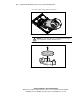
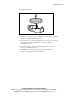
To install a new battery:
1. If the server is on, remove power from the system. For detailed
instructions, see the “Preparation Procedures” section in Chapter 3,
“Installing Hardware Options.”
2. Remove the access panel. See the “Removing the Access Panel” section
in Chapter 3, “Installing Hardware Options.”