
Compaq ProLiant DL380 Generation 2 Setup and Installation Guide


LED Indicators and Switches E-19
Compaq Confidential – Need to Know Required
Writer: Rob Weaver Project: Compaq ProLiant DL380 Generation 2 Server Setup and Installation Guide Comments:
Part Number: 203844-001 File Name: n-appe LED Indicators and Switches.doc Last Saved On: 4/5/01 2:11 PM
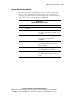
System Maintenance Switch
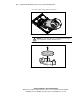
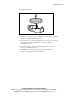
The system maintenance switch (Figure E-11) is a six-position switch that is
used for system configuration. The default setting for all six positions is off.
For the proper system maintenance switch settings, refer to the labels attached
to the inside of the server access panel or to Table E-10.
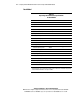
Table E-10
System Maintenance Switch
Position Description On/Off Function
1 Reserved —
2 Configuration lock Off = System configuration can be modified.
On = System configuration is locked and cannot
be modified.
3 Rack mount indicator Off = System is in a tower configuration.
On = System is in a rack-mounted
configuration.
4 Enable diskette boot Off = RBSU controls booting from diskette.
On = Booting from diskette is enabled and
RBSU is overridden.
5 Password disable Off = Power-on password is enabled.
On = Power-on password is disabled.
6 Invalidate configuration Off = No function
On = ROM treats the system configuration as
invalid.