
Compaq ProLiant DL380 Generation 2 Setup and Installation Guide




E-18 Compaq ProLiant DL380 Generation 2 Server Setup and Installation Guide
Compaq Confidential – Need to Know Required
Writer: Rob Weaver Project: Compaq ProLiant DL380 Generation 2 Server Setup and Installation Guide Comments:
Part Number: 203844-001 File Name: n-appe LED Indicators and Switches.doc Last Saved On: 4/5/01 2:11 PM
SCSI Interlock Disable Switch
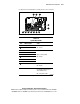
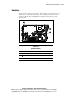
The SCSI interlock disable switch (Figure E-11) is a two-position switch that
enables the system to boot when the Smart Array 5i Controller is not installed
on the system board. The default setting requires the system to halt during boot
if the controller is not installed.
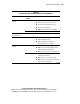
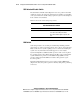
Table E-9 shows the switch settings and positions.
Table E-9
SCSI Interlock Disable Switch
Position Description On/Off Function
1 SCSI interlock disable Off = Interlock failure applies to both the PCI
riser and the Smart Array 5i Controller.
On = Interlock failure applies only to the PCI
riser.
2 Reserved —
NMI Switch
Crash dump analysis is an essential part of eliminating reliability problems
such as hangs or crashes in operating systems, device drivers, and applications.
Many crashes freeze a system, requiring you to do a hard reset. Resetting the
system erases any information that would support root cause analysis.
Systems running Microsoft Windows NT experience a blue screen trap when
the operating system crashes. When this happens, Microsoft recommends that
system administrators perform a non-maskable interrupt (NMI) event by
pressing a dump switch. The NMI event enables a hung system to again
become responsive.
The ProLiant DL380 Generation 2 server is equipped with an NMI switch
(Figure E-11) that, when pushed, performs a memory dump before performing
a hard reset.