
Compaq ProLiant DL380 Generation 2 Setup and Installation Guide


1-6 Compaq ProLiant DL380 Generation 2 Server Setup and Installation Guide
Compaq Confidential – Need to Know Required
Writer: Rob Weaver Project: Compaq ProLiant DL380 Generation 2 Server Setup and Installation Guide Comments:
Part Number: 203844-001 File Name: b-ch1 Server Features.doc Last Saved On: 4/5/01 1:51 PM
Mass Storage Devices
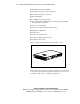
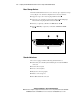
The ProLiant DL380 Generation 2 server can house up to eight mass storage
devices (Figure 1-2). Standard configurations for drive bays include:
■ Support for up to six 1-inch, hot-plug SCSI hard drives
■ Support for one optional 1.6-inch Compaq Universal Hot-Plug Tape
drive with five hot-plug SCSI hard drives installed
■ One bay occupied by a slimline 1.44-MB diskette drive
■ One CD MultiBay occupied by a removable 24X IDE CD-ROM
drive
3 4
1
2
Figure 1-2. ProLiant DL380 Generation 2 server drive positions
Standard Interfaces
The server is equipped with the following standard interfaces:
■ Smart Array 5i Controller (internal SCSI port and external VHDCI
connector)
■ Serial connector (teal)
■ Video connector (blue)
■ Keyboard connector (purple)
■ Mouse connector (green)
■ Two Ethernet RJ-45 connectors