
Compaq ProLiant DL380 Generation 2 Setup and Installation Guide




E-16 Compaq ProLiant DL380 Generation 2 Server Setup and Installation Guide
Compaq Confidential – Need to Know Required
Writer: Rob Weaver Project: Compaq ProLiant DL380 Generation 2 Server Setup and Installation Guide Comments:
Part Number: 203844-001 File Name: n-appe LED Indicators and Switches.doc Last Saved On: 4/5/01 2:11 PM
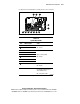
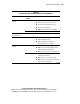
Table E-7
System LEDs and Internal Health LED Status Combinations
continued
System LED and Color Internal Health
LED Color
Status
Red
■ Interleaving error: DIMM is missing from the
bank, and no valid memory exists in another
bank.
■ Interleaving error: DIMMs are mismatched within
the bank, and no valid memory exists in another
bank.
DIMM failure, all slots in
one bank (Amber)
Amber
■ DIMMs have failed over to the online spare bank.
■ Interleaving error: DIMM is missing from the
bank, but valid memory exists in another bank.
■ Interleaving error: DIMMs are mismatched within
the bank, but valid memory exists in another
bank.
DIMM failure, all slots in
all banks (Amber)
Red No valid or usable memory is installed in the system.
Overtemperature (Amber) Red
■ System has reached the operating system
cautionary level.
■ System has exceeded the hardware critical level.
Riser/SCSI interlock failure
(Amber)
Red PCI riser or Smart Array 5i Controller is unseated. *
Power converter module
(Amber)
Red The power converter module has failed.
Red A primary fan has failed.Fan (Amber)
Amber A redundant fan has failed.
Note: * When the SCSI interlock disable switch is set to default (off), the riser/SCSI interlock failure LED
indicates that the PCI riser or the Smart Array 5i Controller is unseated. If the default setting is changed
(on), the LED indicates that only the PCI riser is unseated.
For more detailed server health information, use Compaq Insight Manager XE.
See the “Compaq Insight Manager XE” section in Chapter 7, “Server
Configuration and Utilities.”