
Compaq ProLiant DL380 Generation 2 Setup and Installation Guide



E-2 Compaq ProLiant DL380 Generation 2 Server Setup and Installation Guide
Compaq Confidential – Need to Know Required
Writer: Rob Weaver Project: Compaq ProLiant DL380 Generation 2 Server Setup and Installation Guide Comments:
Part Number: 203844-001 File Name: n-appe LED Indicators and Switches.doc Last Saved On: 4/5/01 2:11 PM
Front Panel LEDs
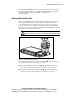
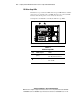
Six LEDs on the front of the server indicate server status. Use Figure E-1 and
Table E-1 to identify LED locations and their functions.
3
4
5
6
2
1
Figure E-1. Front panel LEDs
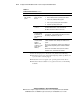
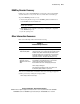
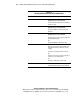
Table E-1
Front Panel LEDs
Item LED Description Status
Internal health Red = System critical
Amber = System degraded
Green = Normal
External health
(power supply)
Red = Critical power supply failure
Amber = Power redundancy failure
Green = Normal
NIC 1 link/activity
NIC 2 link/activity
Green = Network link
Flashing = Network link/activity
Off = No link/activity. If power is off,
view the rear panel RJ-45 LEDs.
Front unit identification
LED switch
Blue = Activated
Off = Deactivated
System power Amber = System shut down, but
power still applied
Green = System on
Off = Power cord not attached or
power supply failure