
Compaq ProLiant DL380 Generation 2 Setup and Installation Guide



Troubleshooting D-13
Compaq Confidential – Need to Know Required
Writer: Rob Weaver Project: Compaq ProLiant DL380 Generation 2 Server Setup and Installation Guide Comments:
Part Number: 203844-001 File Name: m-appd Troubleshooting.doc Last Saved On: 3/27/01 10:25 AM
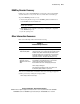
ROMPaq Disaster Recovery
If both sides of the redundant ROM are corrupted, the system automatically
enters the disaster recovery mode. The server emits three extended beeps.
To perform ROMPaq disaster recovery:
1. After hearing the three beeps, insert a ROMPaq diskette with the latest
system ROM from the SmartStart CD.
IMPORTANT: The ROMPaq will flash both sides of the redundant ROM, and this process
may take up to 10 minutes.
2. Wait until the server emits three rising beeps, indicating the completion
of the ROM flash process.
3. Cycle the system power.
Other Information Resources
Refer to the following additional information for help.
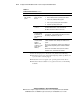
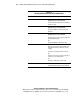
Table D-8
Troubleshooting Resources
Resource Description
Compaq Servers
Troubleshooting Guide
This is a resource for obtaining troubleshooting information
that is beyond the scope of this document. It includes general
hardware and software troubleshooting information for all
Compaq ProLiant servers, a complete list of error messages
along with explanations of probable causes, and a list of
appropriate measures. This guide ships with your server.
Compaq ProLiant DL380
Generation 2 Server
Maintenance and Service
Guide
This resource provides a complete list of all replacement
parts available, along with instructions on removal and
replacement. Find a link to this guide on the
Documentation CD or at the Compaq support website:
www.compaq.com/support
Follow the link for maintenance and service guides, and
download the guide provided for your server.
You can access information on warranties and service and support upgrades
(CarePaq services) by visiting the Compaq website:
www.compaq.com/services/carepaq