
Compaq ProLiant DL380 Generation 2 Setup and Installation Guide



D-10 Compaq ProLiant DL380 Generation 2 Server Setup and Installation Guide
Compaq Confidential – Need to Know Required
Writer: Rob Weaver Project: Compaq ProLiant DL380 Generation 2 Server Setup and Installation Guide Comments:
Part Number: 203844-001 File Name: m-appd Troubleshooting.doc Last Saved On: 3/27/01 10:25 AM
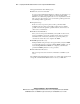
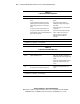
Table D-5
Is the Internal Health LED Green?
continued
Answer Possible Reasons Possible Solutions
Yes If the internal health LED is green, see Table D-6.
Note: For LED locations and functions, see Appendix E, “LED Indicators and Switches.” For cabling
configurations, see Chapter 6, “Server Cabling.”
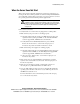
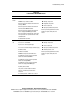
Table D-6
Is the Monitor Displaying Information?
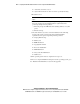
Answer Possible Reasons Possible Solutions
No The monitor may not have power.
Video may not be connected properly.
Nonvolatile RAM (NVRAM) may be corrupted.
The system ROM and redundant ROM may be
corrupted.
The system board and/or PCI riser cage may
need to be replaced.
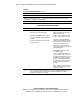
Ensure that the monitor power cord is
plugged in and that the monitor power
switch has been pressed.
If a video card is installed, ensure that
the video cable is properly connected.
If a Remote Insight Lights-Out Edition
expansion board is installed, verify that
the video cable is connected to the video
connector on this expansion board.
Verify the video connections. Refer to
“Video Problems” in the Compaq Servers
Troubleshooting Guide.
Clear NVRAM. See Appendix E for the
correct switch setting.
Are there any audible indicators, such as
a series of beeps? A series of beeps is
the audible signal indicating the presence
of a POST error message. Refer to the
Compaq Servers Troubleshooting Guide
for a complete description of each beep
sequence and the corresponding error
messages.
If these steps do not solve the problem,
contact your Compaq authorized service
provider for assistance.
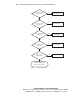
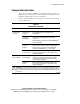
Yes Video is available for diagnosis. Determine the next action by observing POST progress and
error messages. Refer to the Compaq Servers Troubleshooting Guide for a complete
description of each POST error message.