
Compaq ProLiant DL380 Generation 2 Setup and Installation Guide



Troubleshooting D-5
Compaq Confidential – Need to Know Required
Writer: Rob Weaver Project: Compaq ProLiant DL380 Generation 2 Server Setup and Installation Guide Comments:
Part Number: 203844-001 File Name: m-appd Troubleshooting.doc Last Saved On: 3/27/01 10:25 AM
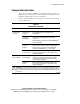
Diagnostic Steps
If your server does not power up, or powers up but does not complete POST,
answer the questions in Table D-1 to determine appropriate actions based on
the symptoms observed. Figure D-1 is a visual representation of the diagnostic
steps in flowchart format.
According to the answers you give, you are directed to the appropriate table in
the section that immediately follows. That table outlines possible reasons for
the problem, options available to assist in diagnosis, possible solutions, and
references to other sources of information.
Table D-1
Diagnostic Steps
Question Action
Question 1: Is the system power LED amber? If yes, continue to question 2.
If no, see Table D-2.
Question 2: Is the system power LED green? If yes, continue to question 3.
If no, see Table D-3.
Question 3: Is the external health LED green? If yes, continue to question 4.
If no, see Table D-4.
Question 4: Is the internal health LED green? If yes, continue to question 5.
If no, see Table D-5.
Question 5: Is the monitor displaying
information?
If yes, use the POST messages for further diagnosis.
See Table D-6 for details.
If no, see Table D-6.