
Compaq ProLiant DL380 Generation 2 Setup and Installation Guide

PCI Hot Plug Technology 8-17
Compaq Confidential – Need to Know Required
Writer: Rob Weaver Project: Compaq ProLiant DL380 Generation 2 Server Setup and Installation Guide Comments:
Part Number: 203844-001 File Name: i-ch8 PCI Hot Plug Technology.doc Last Saved On: 4/2/01 3:23 PM
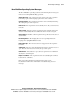
Novell NetWare Operating System Messages
The Novell NetWare operating system uses the following list of messages to
indicate errors during PCI Hot Plug operations:
Adapter Not Same—The expansion board is not the same as the expansion
board being replaced. The hot-plug replacement cannot continue.
Card Functioning—The expansion board in the slot is currently functioning.
The add/replace procedure is ignored.
Driver in Use—The expansion board is currently in use. Do you wish to force
removal?
Driver Loaded—The driver for the expansion board is currently loaded and
cannot be automatically unloaded. Unload the driver and select it again.
General Failure—NetWare could not perform the specified action because of
system failure.
No Hot-Plug Driver—The hot-plug driver is not responding. Ensure the
hot-plug driver (CPQSBD.NLM) is loaded.
Remove Not Supt—The removal action is not supported for the expansion
board/slot.
Switch Open—The slot cannot be initialized because the slot release lever is
open. Close the slot release lever and try the procedure again.
Unknown Slot—The add/remove procedure was performed on an unknown
slot. Try the command again.
Replace Load Driver—The expansion board is successfully replaced. Please
load the driver at this time.
Refer to the online PCI Hot Plug Administration Guide on the
Documentation CD for more information on troubleshooting and error
messages.