
Compaq ProLiant DL380 Generation 2 Setup and Installation Guide




PCI Hot Plug Technology 8-9
Compaq Confidential – Need to Know Required
Writer: Rob Weaver Project: Compaq ProLiant DL380 Generation 2 Server Setup and Installation Guide Comments:
Part Number: 203844-001 File Name: i-ch8 PCI Hot Plug Technology.doc Last Saved On: 4/2/01 3:23 PM
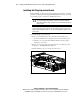
4. Remove the PCI shipping bracket. See the “Removing the PCI Shipping
Bracket” section in Chapter 3, “Installing Hardware Options.”
NOTE: The PCI shipping bracket is only required if you intend to ship the server with PCI
expansion boards installed.
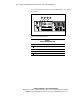
5. Identify the hot-plug expansion slot you want to populate and the PCI
Hot Plug button that manages it. See Figure 8-2.
CAUTION: Do not attempt this hot-plug operation if your operating system does
not provide PCI Hot Plug support, or if you do not have the appropriate device
drivers installed. Failure to properly execute a hot-plug operation can halt your
system.
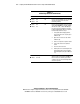
6. Press the PCI Hot Plug button, and observe the blinking green power
LED until the illumination stops.
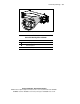
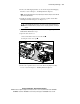
7. Open the slot release lever:
a. Press and hold the release lever to unlock it .
b. Swing the release lever open .
1
2
Figure 8-4. Opening the slot release lever
8. Remove the expansion slot cover. See the “Removing Expansion Slot
Covers” section in Chapter 3, “Installing Hardware Options.”