
Compaq ProLiant DL380 Generation 2 Setup and Installation Guide




8-8 Compaq ProLiant DL380 Generation 2 Server Setup and Installation Guide
Compaq Confidential – Need to Know Required
Writer: Rob Weaver Project: Compaq ProLiant DL380 Generation 2 Server Setup and Installation Guide Comments:
Part Number: 203844-001 File Name: i-ch8 PCI Hot Plug Technology.doc Last Saved On: 4/2/01 3:23 PM
Installing Hot-Plug Expansion Boards
Before installing expansion boards in the hot-plug expansion slots, you must
install an operating system that supports PCI Hot Plug technology. To install
an operating system, see Chapter 4, “Installing the Server.”
CAUTION: Do not attempt a PCI Hot Plug procedure if your operating system
does not provide PCI Hot Plug support, or if you do not have the appropriate
device drivers installed. Failure to properly execute a PCI Hot Plug operation can
halt your system.
IMPORTANT: The following procedure uses the PCI Hot Plug button, instead of a utility, to
power down and power up the expansion slot. For information about procedures using
utilities and PCI Hot Plug applications, see the “PCI Hot Plug Application Support” section
in this chapter.
To install hot-plug expansion boards:
1. If the server is installed in the rack, extend the server from the rack:
a. Loosen the thumbscrews securing the server to the front of the rack.
b. Slide the server out of the rack until the rail-release latches engage,
locking the server rails.
2. Remove the access panel. See the “Removing the Access Panel” section
in Chapter 3, “Installing Hardware Options.”
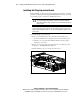
3. Open the PCI riser cage door on the side of the server.
Figure 8-3. Opening the PCI riser cage door