
Compaq ProLiant DL380 Generation 2 Setup and Installation Guide




8-6 Compaq ProLiant DL380 Generation 2 Server Setup and Installation Guide
Compaq Confidential – Need to Know Required
Writer: Rob Weaver Project: Compaq ProLiant DL380 Generation 2 Server Setup and Installation Guide Comments:
Part Number: 203844-001 File Name: i-ch8 PCI Hot Plug Technology.doc Last Saved On: 4/2/01 3:23 PM
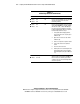
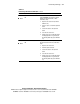
Table 8-3
PCI Hot Plug LED Status Combinations
LED Power Status OK to Open Slot Status
Green
Amber
On
Off
No Power is currently applied to the slot. Do NOT
open the slot release lever. The slot is
functioning normally.
Green
Amber
On
On
No Power is currently applied to this slot, but the
slot needs ATTENTION for a possible problem
with the slot, board, or driver. Do NOT open
the slot release lever. Examine the logs and
Compaq Insight Manager XE. If the expansion
board is faulty, follow these steps:
1. Through the PCI Hot Plug application,
turn off the power to the slot (the green
LED turns off).
2. Open the slot release lever (the amber
LED turns off).
3. Remove or replace the expansion board.
4. Connect the cables to the expansion
board.
5. Close the slot release lever.
6. Return power to the slot through the PCI
Hot Plug application or by pressing the
PCI Hot Plug button (the green LED turns
on).
Green
Amber
Flashing
On or off
No Power to this slot is being turned off or on,
which may take several minutes. DO NOT open
the slot release lever until the green LED is
completely off. Press the PCI Hot Plug button to
cancel the operation.
continued