
Compaq ProLiant DL380 Generation 2 Setup and Installation Guide



PCI Hot Plug Technology 8-3
Compaq Confidential – Need to Know Required
Writer: Rob Weaver Project: Compaq ProLiant DL380 Generation 2 Server Setup and Installation Guide Comments:
Part Number: 203844-001 File Name: i-ch8 PCI Hot Plug Technology.doc Last Saved On: 4/2/01 3:23 PM
For information about procedures using utilities and PCI Hot Plug
applications, see the “PCI Hot Plug Application Support” section in this
chapter.
PCI Hot Plug Feature
The PCI Hot Plug feature, standard in the ProLiant DL380 Generation 2
server, enables you to remove, replace, upgrade, and add PCI expansion
boards without powering down the server. Any expansion board can be placed
in a PCI Hot Plug slot. However, PCI Hot Plug device drivers and operating
system support are required to enable the PCI Hot Plug functionality.
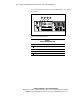
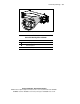
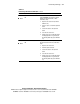
PCI Hot Plug LEDs and Button
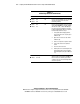
The PCI Hot Plug LEDs for each expansion slot indicate the power and fault
status of each slot. The LEDs are visible externally from the rear of the server
or internally when the PCI riser cage door is open.
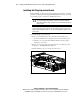
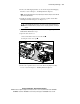
The PCI Hot Plug button enables PCI Hot Plug access directly at each PCI
slot, providing PCI Hot Plug control directly at the server without requiring
the PCI Hot Plug utility software. Press the PCI Hot Plug button once to power
down or power up a slot. You can cancel an action by pressing the button
again within five seconds. When you press the button, the system
automatically stops or starts expansion board drivers.