
Compaq ProLiant DL380 Generation 2 Setup and Installation Guide




7-6 Compaq ProLiant DL380 Generation 2 Server Setup and Installation Guide
Compaq Confidential – Need to Know Required
Writer: Rob Weaver Project: Compaq ProLiant DL380 Generation 2 Server Setup and Installation Guide Comments:
Part Number: 203844-001 File Name: h-ch7 Server Configuration and Utilities.doc Last Saved On: 4/5/01 2:08 PM
Advanced Memory Protection enables you to choose one of the following
memory modes:
■ Standard ECC sets the system to use the standard paired DIMM
configuration.
■ Online Spare support tests the DIMM configuration and sets the system
to use the online spare memory feature.
Utility Language
The Utility Language enables you to set the display language for RBSU. The
following choices are available:
■ English
■ French
■ Italian
■ German
■ Spanish
■ Japanese
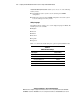
Table 7-1 contains the default settings for options in primary RBSU menus.
Table 7-1
RBSU Default Settings
Menu/Option Default Setting
System Options
OS Selection
—
Embedded COM Port A
Enabled
Embedded Mouse Port
Enabled
Integrated Diskette Controller
Enabled
continued