
Compaq ProLiant DL380 Generation 2 Setup and Installation Guide




6-8 Compaq ProLiant DL380 Generation 2 Server Setup and Installation Guide
Compaq Confidential – Need to Know Required
Writer: Rob Weaver Project: Compaq ProLiant DL380 Generation 2 Server Setup and Installation Guide Comments:
Part Number: 203844-001 File Name: g-ch6 Server Cabling.doc Last Saved On: 3/27/01 10:43 AM
External Cabling
The following sections describe cabling for peripheral devices and external
mass storage devices supported by the ProLiant DL380 Generation 2 server.
Power Cord and Peripheral Device Cabling
Rear panel cabling on the ProLiant DL380 Generation 2 server must always be
connected and disconnected in a specific sequence. For a detailed explanation
of connectors and the proper cabling sequence, see the “Connecting the Power
Cord and Peripheral Devices” section in Chapter 4, “Installing the Server.”
CAUTION: Always follow the cabling order for the ProLiant DL380 Generation 2
server because an improper cabling sequence can result in electrical damage to
peripheral devices.
External Mass Storage Cabling
The following sections explain the connectors and guidelines for external
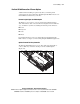
SCSI cabling on the ProLiant DL380 Generation 2 server. SCSI port 1
controls external SCSI devices through a VHDCI SCSI connector on the rear
panel of the server (Figure 6-9).
3
2
Figure 6-9. Locating the external VHDCI SCSI connector on the rear panel