
Compaq ProLiant DL380 Generation 2 Setup and Installation Guide




Server Cabling 6-7
Compaq Confidential – Need to Know Required
Writer: Rob Weaver Project: Compaq ProLiant DL380 Generation 2 Server Setup and Installation Guide Comments:
Part Number: 203844-001 File Name: g-ch6 Server Cabling.doc Last Saved On: 3/27/01 10:43 AM
ProLiant DL380 Generation 2 Server Options
Additional internal cabling is required only when you install optional
expansion boards, such as the Remote Insight Lights-Out Edition board or an
internal PCI-based Smart Array controller.
Remote Insight Lights-Out Edition Option
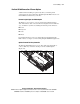
The PCI riser cage provides a connector for the Remote Insight interface
cable. The interface cable connects the Remote Insight board to the PCI riser
cage, and thus the system board, enabling the following remote functions:
■ Power
■ Keyboard
■ Video
■ Mouse
For detailed instructions on how to cable the Remote Insight Lights-Out
Edition board, see Chapter 5, “Remote Insight Lights-Out Edition (Optional).”
Optional Internal PCI Array Controller
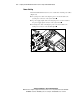
The ProLiant DL380 Generation 2 server ships with a long SCSI cable to
connect a PCI array controller to SCSI port 2 on the SCSI backplane
(Figure 6-8).
Figure 6-8. Long SCSI cable connecting a PCI array controller to SCSI port 2