
Compaq ProLiant DL380 Generation 2 Setup and Installation Guide


Remote Insight Lights-Out Edition (Optional) 5-11
Compaq Confidential – Need to Know Required
Writer: Rob Weaver Project: Compaq ProLiant DL380 Generation 2 Server Setup and Installation Guide Comments:
Part Number: 203844-001 File Name: f-ch5 Remote Insight Lights-Out Edition.doc Last Saved On: 4/11/01 10:53 AM
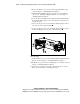
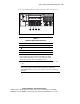
12. Locate the Remote Insight external connectors on the rear of the server.
1
4
2
3
3
2
Figure 5-4. Remote Insight external connectors
Table 5-1
Remote Insight External Connectors
Item Description
RJ-45 connector
Keyboard/mouse connector *
Video connector
AC adapter connector *
Note: * Do not use the keyboard/mouse loopback cable when the internal
Remote Insight interface cable is installed. The AC adapter is not needed
for the ProLiant DL380 Generation 2 server. The internal Remote Insight
interface cable replaces the functions provided by these items.
13. Disconnect your video cable from the video connector on the rear of the
server.
IMPORTANT: Always connect your video cable to the external video connector on the
Remote Insight expansion board. When Remote Insight board is installed in the
ProLiant DL380 Generation 2 server, the video connector on the server rear panel does
not function.