
Compaq ProLiant DL380 Generation 2 Server High-Density Deployment in Compaq Racks


Compaq ProLiant DL380 Generation 2 Server High-Density Deployment in Compaq Racks 30
Compaq Confidential - Need to Know Required
14UH-0701A-WWEN
Installing the Rack Rails
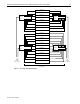
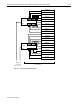
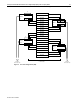
The following procedure describes how to install the standard rack rails onto the rack. The rails
are designed to snap in place without screws or nuts.
1. Remove the server rails from the left and right standard rails.
2. Insert the rails into the rack holes.
3. Install the server rails on the chassis.
4. Insert the server into the rack.
5. Install the cable management arm.
6. Cable and power up the server.
Repeat the procedure for any subsequent rack rails. For detailed instructions on installing
standard rack rails, refer to the Compaq ProLiant DL380 Generation 2 Server Setup and
Installation Guide and to the Compaq ProLiant DL380 Generation 2 Hardware Configuration
and Installation Poster.
CAUTION: Always install servers from the bottom of the rack to the top. Installing
servers in this manner provides more stability for the rack and reduces the risk of the rack
tipping over.
IMPORTANT: Before installing the rack rails for the standard rack rails and cable
management arm, remove the server rails from the slide rail assembly. See the “Preparing the
ProLiant DL380 Generation 2 for Rack Installation” section in this paper for more information.
IMPORTANT: Install a ProLiant DL380 Generation 2 server in every U-space from the bottom
to the top for maximum density.