
Compaq ProLiant DL380 Generation 2 Server High-Density Deployment in Compaq Racks


Compaq ProLiant DL380 Generation 2 Server High-Density Deployment in Compaq Racks 29
Compaq Confidential - Need to Know Required
14UH-0701A-WWEN
Routing Power Cords
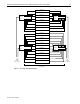
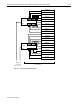
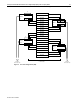
Use the following general procedures to route server power cords in 36U and 42U racks.
IMPORTANT: When installing server power cords into the PDUs, ensure that the load is
balanced among the output circuit breakers.
High-Voltage Power Cords
To route and connect low-voltage power cords:
IMPORTANT: Route and connect the high-voltage power cord to the PDU after the server is
installed.
1. Connect the power cord to the server and route it through the cable management system with
the other server cables.
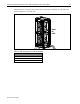
2. Route the power cord inside the rear rack support to the PDU.
High-Voltage Y-Cables
To route high-voltage Y-cables:
1. Connect the single-cord section of the Y-cable to the PDU installed on the same side as the
cable management tray.
2. Align the Y-joint with the rear rack support and center it between the rack rails of the two
servers that the Y-cable supports.
3. Use two plastic tie wraps to secure the Y-joint to the rack support.
4. After installing the servers, connect the cables to the servers and route them through the cable
management system with the other server cables.
Low-Voltage Power Cords
To route and connect low-voltage power cords:
IMPORTANT: Route and connect the low-voltage power cord to the PDU after the server is
installed.
1. Connect the power cord to the server first and route it through the cable management system
with the other server cables.
2. Route the power cord inside the rear rack support to the PDU.
IMPORTANT: In 7000-series racks, route the power cables from the servers to the PDUs
through the gap in the rear of the rack rail.