
Compaq ProLiant DL380 Generation 2 Server High-Density Deployment in Compaq Racks


Compaq ProLiant DL380 Generation 2 Server High-Density Deployment in Compaq Racks 21
Compaq Confidential - Need to Know Required
14UH-0701A-WWEN
WARNING: Follow these guidelines to reduce the risk of personal injury or damage to
the equipment:
• Do not install a ProLiant DL380 Generation 2 server into a rack until the rack has
been placed in its final location.
• Pre-install slide rails, PDUs, power cords, and cables into the rack in a build room or
other location before moving the rack to its final location.
• Extend the leveling jacks to the floor and rest the full weight of the rack on the jacks
b
efore installing any servers. The casters are not designed to support the full weight of
a populated rack.
• Do not move a rack populated with servers. A fully populated rack can weigh up to
1,800 pounds. Moving a populated rack can cause the rack to become unstable,
resulting in serious personal injury or equipment damage.
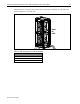
To effectively cool the ProLiant DL380 Generation 2 servers in a 7000-series rack, replace the
front door of the rack with the High Air Flow Rack-Door Insert before deploying the servers in
the rack. See Table 13 for rack-door insert part numbers.
Compaq strongly recommends using the Compaq Rack Extension kit (P/N 154392-B21) to
alleviate any space problems for cable bundles at the rear of 7000-series racks.
Cabling and Rack Configurations
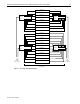
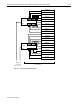
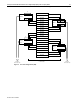
The figures on the following pages show three possible cabling and rack configurations. The
configurations do not include every possible combination.