
Compaq ProLiant DL380 G2 Service Update

Compaq ProLiant DL380 G2 Service Update 16
Rev. 1.0 Page 16 of 17
Step Action
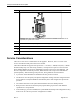
CAUTION: PPM slots must be populated when processors are installed. If PPM slots are not
populated, the system does not boot.
8.
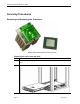
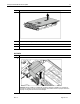
Install a PPM in the corresponding slot, if the slot is empty.
9.
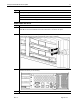
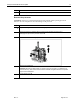
Install the air baffle.
10.
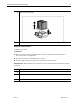
Install the access panel.
11.
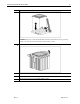
Slide the server back into the rack.
Service Considerations
There are no new service considerations for this upgrade. However, here is a review of the
service considerations that pertain to this new module.
The ProLiant DL380 G2 supports three processors: a 1.13-GHz , 1.26GHz, and (now) a 1.4GHz
Pentium III Flip Chip - Pin Grid Array (FC-PGA) . Each processor requires its own Processor
Power Module (PPM). The processor and PPM are located on the server's System Board . The
Processor Option Kit contains the processor, PPM and heat sink. The processor and PPM are
spared separately. When installing a 2nd processor, these guidelines must be followed.
A processor and its PPM must be installed in the first processor location
The Processor Core Frequency and Speed configuration settings cannot be changed from the
factory default. The System ROM will automatically detect and configure the speed of the
processor.
The Chassis ID switch on the system board should be left in the default positions.
Both processors must be the same frequency/speed. Mixing of processors with different
specifications is not permitted.
After installing a processor and PPM, the system ROM based Setup and Configuration Utility
must be ran. Save the new processor configuration to CMOS.