
Compaq ProLiant DL380 G2 Service Update

Compaq ProLiant DL380 G2 Service Update 14
Rev. 1.0 Page 14 of 17
6.
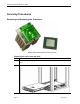
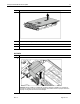
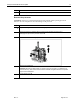
Remove the processor .
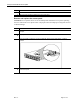
Replace the processor
To replace a processor:
CAUTIONS:
■ Processor socket 1 must be populated with a processor at all times. The system fails to
boot if the socket is not populated.
■ Do not mix processors of different types or speeds.
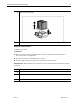
■ You must align the processor pins to seat the processor into the socket
IMPORTANT: When installing a new processor, refer to the documentation that ships with the
processor.
Step Action
1.
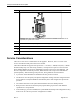
Align the notched corner of the processor with the notched corner of the socket.
2.
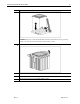
Insert the processor .
3.
Close the locking lever on the processor socket .