
Compaq ProLiant DL380 G2 Service Update

Compaq ProLiant DL380 G2 Service Update 11
Rev. 1.0 Page 11 of 17
Step Action
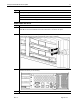
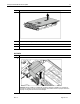
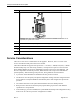
5. Disconnect all remaining cables on the server rear panel.
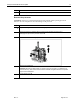
Remove and replace the access panel
CAUTION: Do not operate the server for extended periods without the access panel. Operating
the server without the access panel results in improper airflow and improper cooling that can lead
to thermal damage.
Step Action
1.
Extend or remove the server from the rack. See the “Preparation Procedures” section in this
chapter.
2.
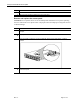
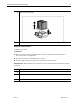
Flip up the hood latch handle .
3.
Turn the handle one-half turn counter-clockwise . When the latch disengages, it extends
upward.
4.
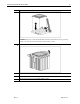
Slide the access panel toward the rear of the unit about 1.25 cm (0.5 inch) and lift to
remove the panel.