
Compaq ProLiant DL380 G2 Service Update



Compaq ProLiant DL380 G2 Service Update 10
Rev. 1.0 Page 10 of 17
Step Action
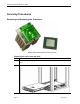
After performing the maintenance procedure, slide the server back into the rack:
a. Press the server rail-release latches.
b. Slide the server fully into the rack.
3.
c. Secure the server by tightening the thumbscrews.
Power down the server
Step Action
1.
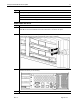
Press the front unit identification LED switch on the server front panel to illuminate the
LED . The rear unit identification LED switch illuminates on the server rear panel.
2.
Press the server Power On/Standby button to place the server in standby mode . The
system power LED turns to amber when standby power mode is activated.
3. At the rear of the server, locate the illuminated rear unit identification LED switch that
identifies the server you are servicing.
4. Disconnect all power cords.