
HP Insight Management WBEM Providers for HP integrated VMWare ESXi




System Fan
9-4-9 HP_DeviceIndication: Fan Redundancy Restored
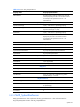
Table 9-29 HP_DeviceIndication: Fan Redundancy Restored
Property name Property implementation
RecommendedActions No action is recommended.
HP_AlertIndication
Summary Cooling redundancy has been restored
EventCategory 23 (System Cooling)
ProbableCause 1 (Other)
ProbableCauseDescription Cooling Redundancy has been Restored
9-4-10 HP_DeviceIndication: Fan Redundancy Failed
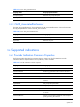
The redundancy failed indication is not supported on ProLiant systems since redundancy
set failure, which is failure beyond redundancy lost, will cause system shutdown.
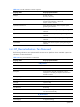
Table 9-30 HP_DeviceIndication: Fan Redundancy Failed
Property name Property implementation
CIM_Indication
PerceivedSeverity 5 (Major))
CIM_AlertIndication
Description Cooling redundancy for the system has failed.
(RedundancySetCaption)
where RedundancySetCaption is
SMX_FanRedundancySet.Caption of the cooling
redundancy set with failed redundancy
AlertingManagedElement WBEM path of the SMX_FanRedundancySet instance
representing the cooling redundancy set with failed
redundancy
AlertingElementFormat 2 (CIMObjectPath)
AlertType 5 (Device Alert)
EventID 10
ProviderName HP Cooling
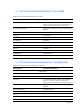
RecommendedActions Check the fan configuration and check the status of the
cooling redundancy. Ensure the system is being cooled
adequately. Add or replace fans if necessary.
HP_AlertIndication
Summary Cooling redundancy has failed