
Ultra-Dense Server Deployment in Third-Party Racks

Compaq Ultra-Dense Server Deployment in Telecommunications (Telco) Racks 15
12CZ-0400A-WWEN
Console Management Choices and Cabling
for Ultra-Dense Server Deployment
The console management scheme determines cabling design and management.
Two ways to design deployment of ultra-dense 1U Compaq ProLiant DL360 servers include:
• Use of remote management option boards, such as the Remote Insight Lights-Out Edition, in
each server.
• Use of rack space to house console switches, monitors and keyboards.
Remote Insight Lights-Out Edition
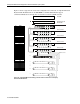
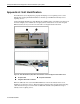
Remote management boards simplify server monitoring, control and wiring. Typical wiring for a
Compaq ProLiant DL360 Server with a Remote Insight Lights-Out Edition installed is reduced to
the server power cord, the Remote Insight Lights-Out Edition CAT5 network connection, and the
two CAT5 cables to the redundant server NICs. The Compaq ProLiant DL360 server uses an
internal cable to supply power to the Remote Insight Lights-Out Edition and to eliminate
loop-back cabling for the keyboard, mouse, and video.
Figure 10: Typical wiring using the Remote Insight Lights-Out Edition board
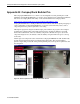
The Remote Insight Lights-Out Edition allows full graphical control of the server, even when the
server operating system is down or the server is powered off. The Remote Insight Lights-Out
Edition can cycle the power on the server and allow a reboot from a virtual floppy imaged
anywhere on the network. The Remote Insight Lights-Out Edition is accessed through a Web
browser and no additional software is required on the server or the system providing access.
For additional information on remote management options, consult the Compaq website:
http://www.compaq.com/manage/