
Ultra-Dense Server Deployment in Racks

Compaq Ultra-Dense Server Deployment in Compaq Racks 81
128H-0400A-WWEN
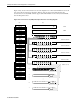
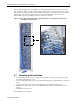
After the cable management system installation of several ProLiant DL360 servers, the rear of the rack
will look similar to Figure 4-28. Note that the cables exiting the rack are shown here at the bottom of the
rack, though many customers might route these cables towards the top of the rack. Also note the extended
stabilizer feet on the rack. The expanded view shows the cable management system where a few
ProLiant DL360 servers are partially extended out at the front of the rack.
Figure 4-28. Completed cable management system installation using sliding rails with remote
management network cables
4.7 Completing the Installation
• Secure the rack rails if necessary to comply with requirements for certain geographic areas, such as
areas where earthquakes may occur.
• Secure each ProLiant DL360 server in the rack by tightening the front panel thumbscrews on the front
bezel.
• Secure the other units (if any) in the rack by tightening the appropriate mounting screws.
• Install the side panels for the outside side compartment, if the rack is located at the end of a suited
rack row.
• Install the front and rear doors.
The installation is now complete.