
Ultra-Dense Server Deployment in Racks

Compaq Ultra-Dense Server Deployment in Compaq Racks 80
128H-0400A-WWEN
4.6.3.2. Sliding-Rail Cable Management
For details on the installation procedures in this section, refer to the Sliding Rails and Cable Management
Solutions for ProLiant DL360 Servers Guide and the option’s documentation.
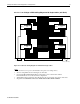
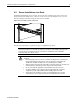
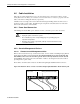
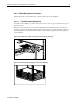
Figure 4-25 shows how the cables are attached on the server rear panel and are routed through the plastic
wheels on the Sliding Mount Cable Tray, starting with the cables closest to the tray.
Figure 4-25. Sliding rail cable routing sequence
3
2
1
1
2
3
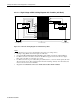
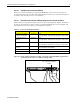
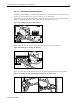
Figure 4-26 shows how the cables are tied together after they are routed on the cable tray.
Figure 4-26. Cable ties for sliding rail cable tray
1
2
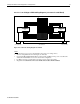
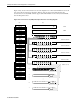
Figure 4-27 shows how the cable bundle is tied to the rack attach bracket and the tension reel bracket.
Figure 4-27. Sliding rail cable rack attach bracket and tension reel bracket