
Ultra-Dense Server Deployment in Racks

Compaq Ultra-Dense Server Deployment in Compaq Racks 28
128H-0400A-WWEN
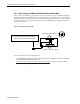
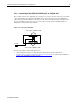
The optional Compaq Remote Insight Lights-Out Edition is recommended for remote console
management in this configuration. The network cables originating from each ProLiant DL360 server
connect to network switches outside this rack enclosure. This configuration still accommodates a
“walk-up” local console, whereby a person can walk up to the rear of the rack and plug in a set of
keyboard/video/mouse (KVM) cables to any server rear panel in the rack.
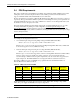
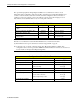
Configuration-A Parts List
Description Compaq P/N Qty. Notes
Sliding rails and cable management solution
option
174575-B21 42 Optional for in-rack servicing
Remote Insight Lights-Out Edition option 157866-001 42 N.A. [See Note(a)]
High Voltage 24A PDU option 295363-001 2 N.A. [See Note(b)]
Vertical-Mount PDU Bracket Kit with High
Voltage Cables
166097-B21 2 Contains 4 PDU brackets and
11 Y-power cords
Note:
This list does not include the rack, the ProLiant DL360 servers, and the network cables.
(a) Part numbers for the regions outside N.A. are listed in Appendix B on page 83.
(b) At this time, only one model of the high current (24A) High Voltage PDU is available. This
configuration can be used in regions where NEMA electrical standards are followed. See Section 2.3.1
for more details on the high current High Voltage PDU.
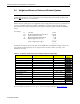
Configuration-A Installation Procedure
Procedure Section [page]
ProLiant DL360 Preparation 4.1 [55]
Rack Preparation 4.2 [56]
PDU Installation Mechanical unit
Power cord wiring
4.3.2 [59]
4.3.5.1 [62]
Rack Rails Installation 4.4 [74]
Rack Population 4.5 [75]
Cable Dressing Power cord connections
Console cable connections
Cable management procedure
4.6.1 [76]
4.6.2.1 [76]
4.6.3 [79]
Completing the Installation 4.7 [81]