
ProLiant DL360 Server Technology
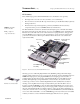
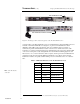
Table Of Contents
- Abstract
- Introduction
- Unique Mechanical and Electrical Design
- 1U Geometry
- Unique Thermal Design
- Virtually No Internal Cables
- Tool-Free Serviceability
- Total Solution for any Computing Environment
- Fixed Rack Rails
- Slide Rails and Cable Management Solution
- Telco Rack Option
- Third-Party Rack Rails
- Desktop/Stackable Option
- System Manageability
- ProLiant DL360 Server Architecture
- Processor/Memory Subsystem
- I/O Subsystem
- Power Subsystem
- Conclusion
T
ECHNOLOGY
B
RIEF
(cont.) Compaq ProLiant DL 360 Server Technology
8
TC000601TB
.
.
.
.
.
.
.
.
.
.
.
.
.
.
.
.
.
.
.
.
.
.
.
.
.
.
.
.
.
.
.
.
.
.
.
.
.
.
.
.
.
.
.
.
.
.
.
.
.
.
.
.
.
.
.
.
.
.
.
.
.
.
.
.
.
.
.
.
.
.
.
.
.
.
.
.
.
.
.
.
.
.
.
.
.
.
.
.
.
.
.
.
.
.
.
.
.
.
.
.
.
.
.
.
.
.
.
.
.
.
.
.
.
.
.
.
.
.
.
.
.
.
.
.
.
.
.
.
.
.
.
.
.
.
.
.
.
.
.
.
.
.
.
.
.
.
.
.
.
.
.
.
.
.
.
.
.
.
.
.
.
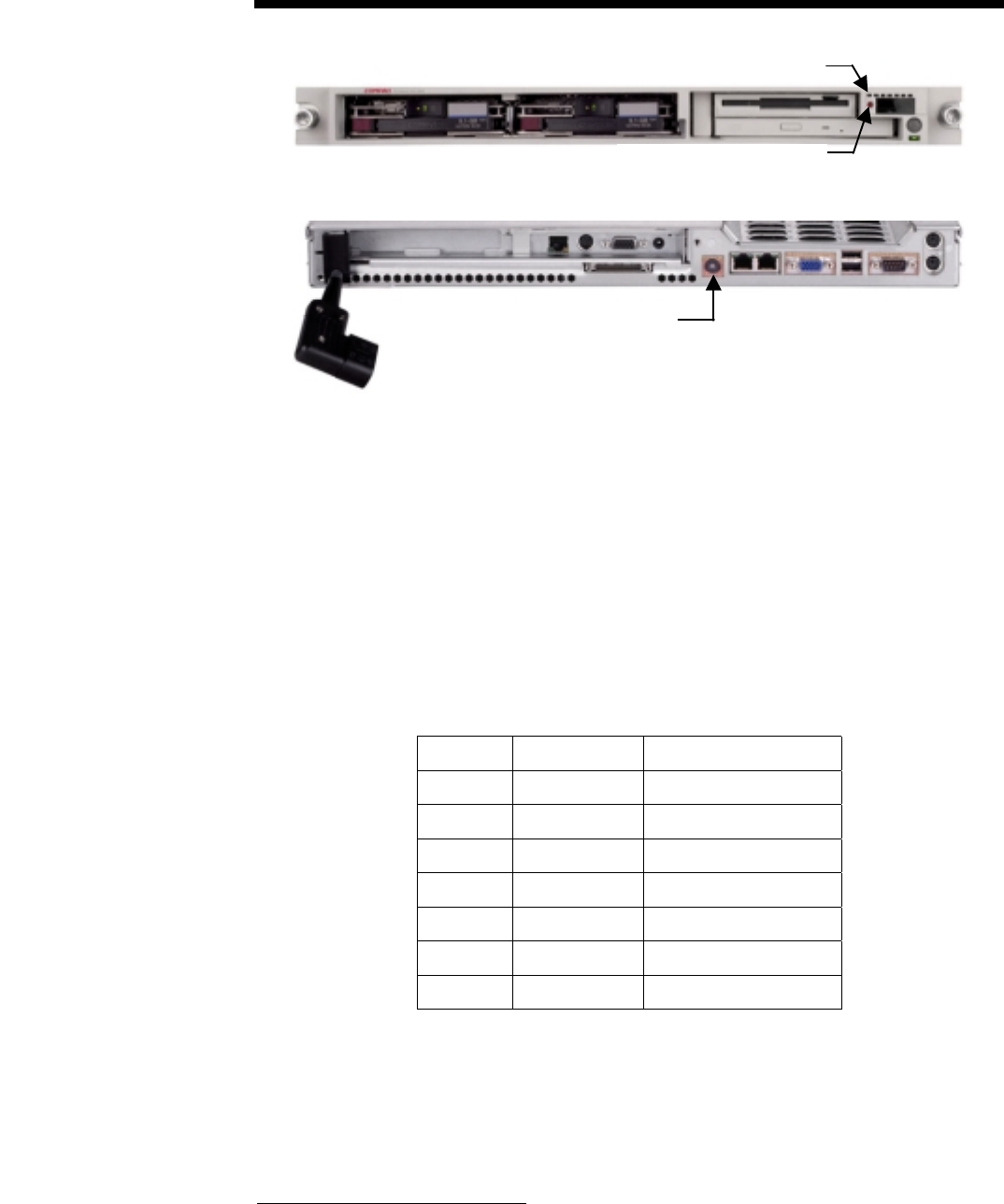
Unit Identification LED
Unit Identification Switch
Unit Identification Switch and LED
Figure 4. Front (top) and rear (bottom) panels of the ProLiant DL360 server
A unique feature of the ProLiant DL360 server is a Unit Identification switch and LED on the front
and back of each ProLiant DL360 server (Figure 4). A push of a Unit Identification switch
illuminates a blue LED on the front and back of the server simultaneously. For example, a
technician can push the Unit Identification switch on the front of a rack-mounted server, walk
around the row of racks, and then find that server immediately from the rear because the blue LED
on the server's back panel is easily distinguishable from other LEDs and blinking lights in a rack
full of servers. As soon as the technician’s task is complete, another push of the Unit Identification
switch turns off the front and rear blue LEDs and unmarks the server. The front and rear Unit
Identification switches are equally useful in marking servers for immediate action or for attention
later.
Table 1: LED Status Indicators on the ProLiant DL360 Server
LED No.
1
LED Color Status
1 Green/Amber Power on/Standby
2 Green Disk drive activity
3 Green Integrated NIC2 link
4 Green Integrated NIC2 active
5 Green Integrated NIC1 link
6 Green Integrated NIC 1 active
7 Blue Unit identification
1
These numbers indicate the relative position of the individual LEDs from right to left on the LED module.
NIC: network interface
controller