
ProLiant DL360 Server Technology
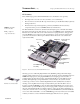
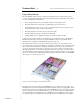
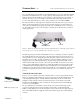
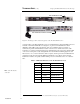
Table Of Contents
- Abstract
- Introduction
- Unique Mechanical and Electrical Design
- 1U Geometry
- Unique Thermal Design
- Virtually No Internal Cables
- Tool-Free Serviceability
- Total Solution for any Computing Environment
- Fixed Rack Rails
- Slide Rails and Cable Management Solution
- Telco Rack Option
- Third-Party Rack Rails
- Desktop/Stackable Option
- System Manageability
- ProLiant DL360 Server Architecture
- Processor/Memory Subsystem
- I/O Subsystem
- Power Subsystem
- Conclusion

T
ECHNOLOGY
B
RIEF
(cont.) Compaq ProLiant DL 360 Server Technology
7
TC000601TB
.
.
.
.
.
.
.
.
.
.
.
.
.
.
.
.
.
.
.
.
.
.
.
.
.
.
.
.
.
.
.
.
.
.
.
.
.
.
.
.
.
.
.
.
.
.
.
.
.
.
.
.
.
.
.
.
.
.
.
.
.
.
.
.
.
.
.
.
.
.
.
.
.
.
.
.
.
.
.
.
.
.
.
.
.
.
.
.
.
.
.
.
.
.
.
.
.
.
.
.
.
.
.
.
.
.
.
.
.
.
.
.
.
.
.
.
.
.
.
.
.
.
.
.
.
.
.
.
.
.
.
.
.
.
.
.
.
.
.
.
.
.
.
.
.
.
.
.
.
.
.
.
.
.
.
.
.
.
.
.
.
An internal ribbon cable connecting the CD-ROM/floppy drive assembly to the system board lies
flat under the power supply. The power supply engages directly to the system board through a
single right-angled connector.
A short internal cable provides an interface from the keyboard, mouse, and power supply to the
optional Compaq Remote Insight Lights-Out Edition. This configuration eliminates the need for an
external keyboard/mouse cable and an external AC adapter, which greatly improves external cable
management.
Placing the power supply/fan unit near the center of the server requires use of a power cable inside
the chassis. To manage that cable in the tight space without blocking air flow or PCI option cards,
Compaq engineers secured the power cable along the inside edge of the chassis.
Tool-Free Serviceability
For customers deploying hundreds or thousands of servers, ease of deployment and serviceability
are critical factors. Knowing that, Compaq engineers designed the ProLiant DL360 server for
quick, tool-free configuration and easy, in-rack service.
Two front thumbscrews secure the ProLiant DL360 server to a rack. A right-angled power cord and
an effective cable management system reduce cable clutter. The chassis features a tool-free entry,
quick-release, top access panel; slide-in and latching components; quick-release latches; simple
thumbscrews; and easily visible LED status indicators.
The fact that the ProLiant DL360 server has virtually no internal cables makes the unit very easy to
service. There are no cables in the way, and there is no risk of connecting cables in the wrong
places.
The system board slides into place in the chassis and is secured with a single thumbscrew. Two
backplanes provide direct edge connections for hard drives, the CD-ROM/floppy drive assembly,
the power button, and an LED module. A shipping/ejector key serves a double purpose: as a
locking pin to secure the CD-ROM/floppy module in place and as the means of ejecting the module
for service. Simply pushing the shipping/ejector key into the ejector port pops out the module for
quick replacement or to remove it for security purposes. PCI cards slide easily into edge connectors
on either side of the PCI riser board assembly. This drop-in assembly features a lock/release lever
for quick and secure installation or removal of PCI cards. A lever mounted on the side of the power
supply closes easily to hold the power supply securely in place and provide tool-free installation or
removal. Hot-plug drives with an easy release lever can be removed or upgraded one at a time,
without powering off the server.
An LED unit on the front of the ProLiant DL360 server (Figure 4) identifies system status as
indicated in Table 1.