
ProLiant DL360 Server Technology
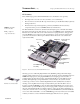
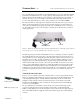
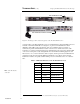
Table Of Contents
- Abstract
- Introduction
- Unique Mechanical and Electrical Design
- 1U Geometry
- Unique Thermal Design
- Virtually No Internal Cables
- Tool-Free Serviceability
- Total Solution for any Computing Environment
- Fixed Rack Rails
- Slide Rails and Cable Management Solution
- Telco Rack Option
- Third-Party Rack Rails
- Desktop/Stackable Option
- System Manageability
- ProLiant DL360 Server Architecture
- Processor/Memory Subsystem
- I/O Subsystem
- Power Subsystem
- Conclusion
T
ECHNOLOGY
B
RIEF
(cont.) Compaq ProLiant DL 360 Server Technology
6
TC000601TB
.
.
.
.
.
.
.
.
.
.
.
.
.
.
.
.
.
.
.
.
.
.
.
.
.
.
.
.
.
.
.
.
.
.
.
.
.
.
.
.
.
.
.
.
.
.
.
.
.
.
.
.
.
.
.
.
.
.
.
.
.
.
.
.
.
.
.
.
.
.
.
.
.
.
.
.
.
.
.
.
.
.
.
.
.
.
.
.
.
.
.
.
.
.
.
.
.
.
.
.
.
.
.
.
.
.
.
.
.
.
.
.
.
.
.
.
.
.
.
.
.
.
.
.
.
.
.
.
.
.
.
.
.
.
.
.
.
.
.
.
.
.
.
.
.
.
.
.
.
.
.
.
.
.
.
.
.
.
.
.
.
By positioning all fans near the middle of the ProLiant DL360 server, Compaq maximized thermal
performance and minimized fan noise. Compaq engineers strategically placed other components
within the chassis and added baffles and curved surfaces to direct air flow and prevent eddies of
warm air. The rear processor, for example, is offset rather than directly aligned with the front
processor. This placement allows cool air to flow past both processors and all the DIMMs.
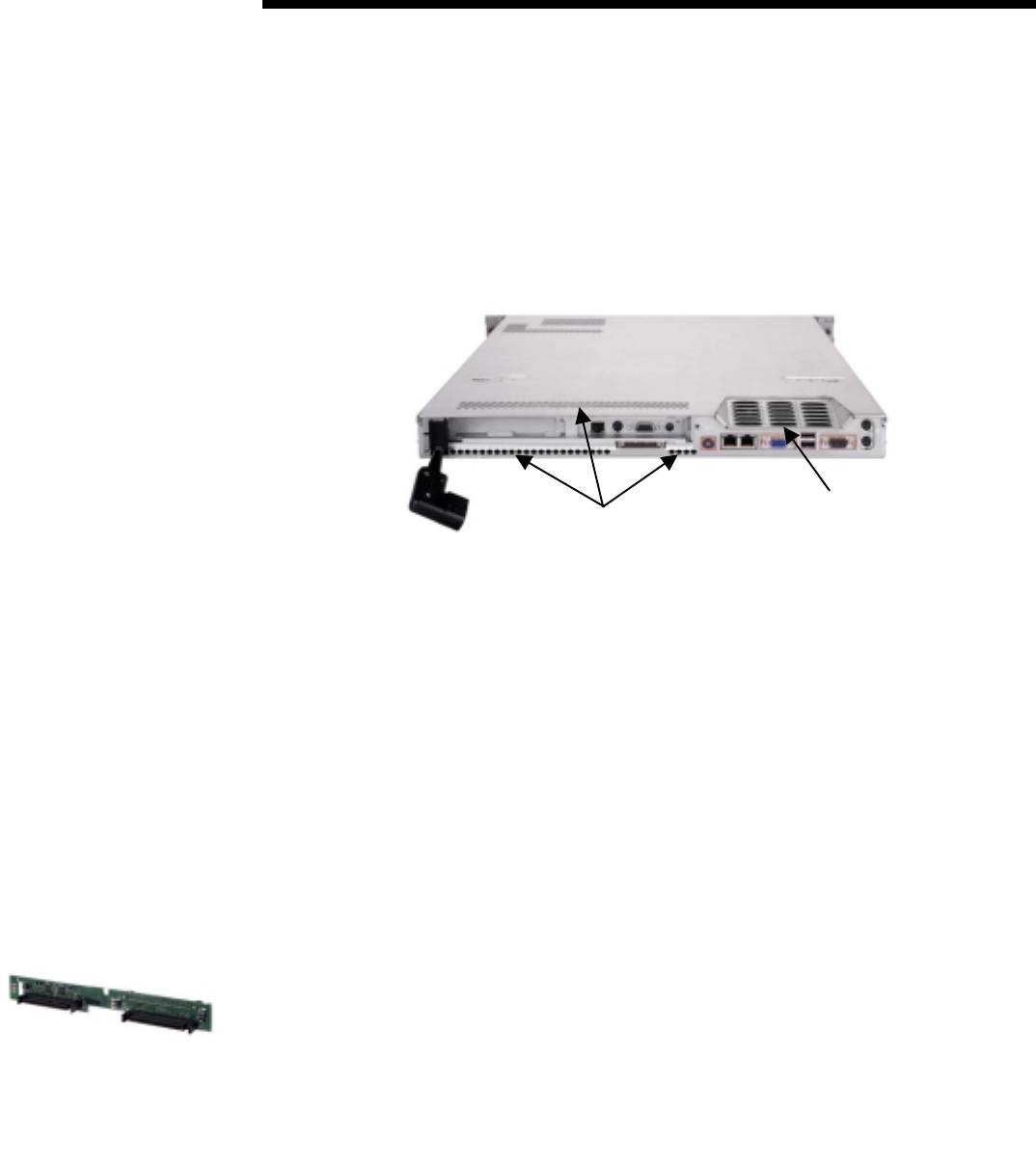
The fans push warm air out through custom-designed louvers at the back of the top access panel
(Figure 3) and through numerous vents in the rear panel. The sloping louvers allow warm air to
vent out the top panel without being trapped by another server immediately above it. Connectors
are strategically positioned low on the rear panel so that they will not block the flow of warm air
venting out the back.
Exhaust Vents
Louvers
Figure 3. Warm air exhausts efficiently from the ProLiant DL360 server through custom-designed
louvers in the top access panel and numerous vents in the rear panel.
Thermal safeguards prevent the ProLiant DL360 server from overheating, even in the event that a
fan should fail. Each fan in the server has its own status signal, which is monitored by the server;
and temperature sensors are strategically placed throughout the system board. Upon detection of a
fan failure, the server will go through a predefined procedure that includes displaying a message,
logging an entry in the system management log, and performing a graceful self-restart or self-
shutdown. If the health driver is loaded on the server and a fan failure is detected, the server may
resume operation after multiple verification proofs that the fan failure detection was either a false
or intermittent signal. This functionality prevents potentially unnecessary system failures. If the
health driver is not loaded and the pressure-blower fan fails, the server will continue operation until
a predefined temperature trip point is reached. At that point, the server will start the shut-down
process.
Virtually No Internal Cables
Even a good server ventilation plan can be defeated if cables or other components block air flow.
Therefore, minimizing internal cables was a major design goal for the ProLiant DL360 server. Use
of two I/O backplanes (Figure 1) virtually eliminates internal cables in the server. The SCSI
backplane connects with the system board, and the hard drives connect directly to the SCSI
backplane. The CD-ROM/floppy drive assembly, the external power button, and the LED array
connect to a second backplane.
The pop-out PCI riser board assembly connects directly to the system board through an edge
connector. A latch holds the riser board assembly securely in place. A dual-channel SCSI
RAID-on-a-Chip (ROC) array controller is integrated on the system board. One channel supports
the two internal Wide Ultra2 hot-plug drives. The other channel supports the external SCSI tape
connector.
SCSI backplane
LED: light-emitting diode