
ProLiant DL360 Server Technology
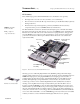
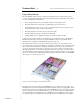
Table Of Contents
- Abstract
- Introduction
- Unique Mechanical and Electrical Design
- 1U Geometry
- Unique Thermal Design
- Virtually No Internal Cables
- Tool-Free Serviceability
- Total Solution for any Computing Environment
- Fixed Rack Rails
- Slide Rails and Cable Management Solution
- Telco Rack Option
- Third-Party Rack Rails
- Desktop/Stackable Option
- System Manageability
- ProLiant DL360 Server Architecture
- Processor/Memory Subsystem
- I/O Subsystem
- Power Subsystem
- Conclusion
T
ECHNOLOGY
B
RIEF
(cont.) Compaq ProLiant DL 360 Server Technology
5
TC000601TB
.
.
.
.
.
.
.
.
.
.
.
.
.
.
.
.
.
.
.
.
.
.
.
.
.
.
.
.
.
.
.
.
.
.
.
.
.
.
.
.
.
.
.
.
.
.
.
.
.
.
.
.
.
.
.
.
.
.
.
.
.
.
.
.
.
.
.
.
.
.
.
.
.
.
.
.
.
.
.
.
.
.
.
.
.
.
.
.
.
.
.
.
.
.
.
.
.
.
.
.
.
.
.
.
.
.
.
.
.
.
.
.
.
.
.
.
.
.
.
.
.
.
.
.
.
.
.
.
.
.
.
.
.
.
.
.
.
.
.
.
.
.
.
.
.
.
.
.
.
.
.
.
.
.
.
.
.
.
.
.
.
Unique Thermal Design
The most difficult obstacle Compaq overcame in designing the 1U server was devising a way to
cool server components adequately in such a densely packed chassis. Careful study of the problem
reveals several important considerations:
• Incorporating fans that can move an adequate volume of air through the server
• Providing sufficient vents and air gaps to pull adequate cool air into the server
• Controlling the flow of air to move cool air over heated components and to prevent hot spots
from developing as a result of warm air recirculation
• Preventing obstruction of air flow by components and cables
• Providing sufficient openings to exhaust hot air efficiently
• Cooling multiple servers adequately when they are densely configured in racks
Compaq engineers employed many design techniques to ensure efficient cooling of the ProLiant
DL360 server. They also used extensive computer simulations and developed physical model
validation tests to evaluate the initial thermal design and to improve it.
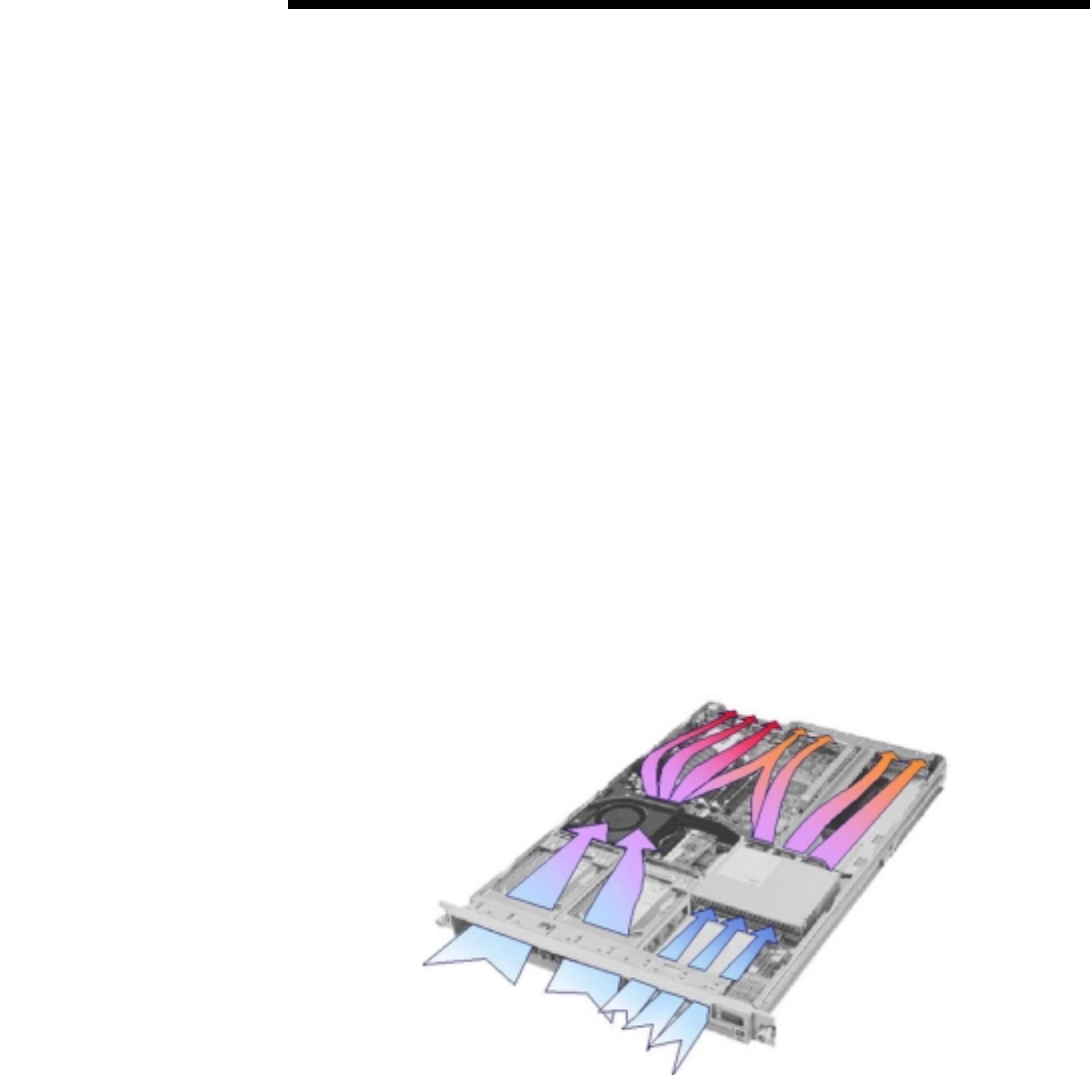
The internal design of the server creates two major air flow regions, one on the left side of the
server and the other on the right side (Figure 2). The left side contains the components that generate
the most heat and are therefore most susceptible to thermal issues in any server: the hard drives,
processors, and memory modules. These components are cooled by a single pressure-blower fan
that pulls a large volume of cool air in through vents in the front of the server, over the hard drives,
and down through the fan. Compaq engineers planned the fan rotation pattern and custom designed
the fan case to incorporate rear fins that direct air blowing from the fan into paths over the DIMMs,
the front processor, and the rear processor.
Figure 2. Air flow through the ProLiant DL360 server
The right side of the server contains the CD-ROM/floppy drive assembly, the power supply, and
the PCI expansion slots. Three smaller fans attached to the back of the power supply pull cool air in
from the front of the server, through the floppy drive, CD-ROM drive, and power supply, and push
the air to the back of the server. The three fans are positioned so that one blows air toward the left
side of the PCI riser board assembly where a 32-bit PCI card can be installed; the other two blow
air toward the right side of the PCI riser board assembly where a 64-bit PCI card can be installed.