
ProLiant DL360 Server Maintenance and Service Guide


Removal and Replacement Procedures
Compaq ProLiant DL360 Server Maintenance and Service Guide 2-39
COMPAQ CONFIDENTIAL Codename: MicroMachine Part Number: 169616-006 Last Saved On: 12/31/01 11:05 AM
CAUTION: Processor socket 1 must be populated at all times. Failure to follow this process
results in the system failing to boot and halting during the POST. This error will result in the
system not functioning properly.
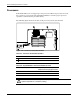
To remove a processor:
1. Complete the preparation procedures. See “Powering Down the Server” earlier in this
chapter.
2. Remove the access panel. See “Server Access Panel” earlier in this chapter.
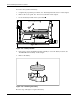
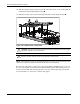
3. Disengage the heatsink-retaining clip
, .
4. Remove the heatsink and thermal pad from the top of the processor
.
NOTE: Some processor shipping configurations may use a thermal compound instead of a thermal pad.
5. Lift the ejecting lever .
6. Remove the processor from the system board
.
3
5
4
1
2
Figure 2-35: Removing the processor
CAUTION: Always use a new thermal pad and heatsink when replacing processors. Failure
to use new components may result in damage to the processor.