
ProLiant DL360 Server Maintenance and Service Guide

Removal and Replacement Procedures
2-18 Compaq ProLiant DL360 Server Maintenance and Service Guide
COMPAQ CONFIDENTIAL Codename: MicroMachine Part Number: 169616-006 Last Saved On: 12/31/01 11:05 AM
SCSI Backplane
To remove the SCSI backplane:
1. Complete the preparation procedures. See “Powering Down the Server” earlier in this
chapter.
2. Remove the access panel. See “Server Access Panel” earlier in this chapter.
3. Remove the hot-plug SCSI hard drives. See “Hot-Plug SCSI Hard Drives” earlier in this
chapter.
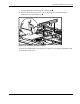
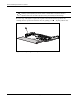
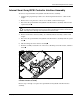
4. Loosen the system board thumbscrew
and remove the thumbscrew assembly that
secures the SCSI backplane to the system board.
2
1
Figure 2-13: Removing the system board thumbscrew assembly