
ProLiant DL360 Server Maintenance and Service Guide

Removal and Replacement Procedures
Compaq ProLiant DL360 Server Maintenance and Service Guide 2-9
COMPAQ CONFIDENTIAL Codename: MicroMachine Part Number: 169616-006 Last Saved On: 12/31/01 11:05 AM
Shipping/Ejector Key
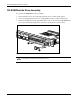
The ProLiant DL360 server includes a shipping/ejector key that secures the
CD-ROM/diskette drive assembly, the DVD-ROM/diskette drive assembly, or the bezel
blank during shipping. This key can be removed and used to eject the CD-ROM/diskette
drive assembly, the DVD-ROM/diskette drive assembly, or the blank.
CAUTION: Always install the shipping/ejector key during shipping to prevent damage to the
server.
IMPORTANT: Compaq recommends that you leave the shipping/ejector key stored inside the chassis
unless your work environment requires frequent use of the ejection feature.
To remove the shipping/ejector key:
1. Complete the preparation procedures. See “Powering Down the Server” earlier in this
chapter.
2. Remove the access panel. See “Server Access Panel” later in this chapter.
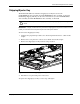
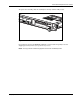
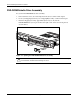
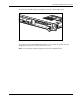
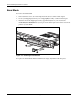
3. Remove the shipping/ejector key from its storage location.
Figure 2-4: Remove the shipping/ejector key
4. Install the access panel and power on the server.
To replace the shipping/ejector key, reverse steps 1 through 4.