
ProLiant DL360 Server Maintenance and Service Guide

Connectors, Switches, and Status Indicators
Compaq ProLiant DL360 Server Maintenance and Service Guide 5-9
COMPAQ CONFIDENTIAL Codename: MicroMachines Part Number: 169616-006 Last Saved On: 1/7/02 10:57 AM
Front Panel Status LED Indicators
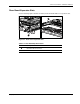
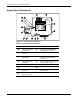
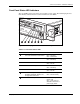
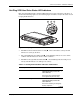
The set of LEDs on the front of the server indicates server status. The following figure and
table identify and describe the location and function of the LEDs.
1
2
3 4 5 6 7
Figure 5-6: Identifying the status LEDs on the front panel
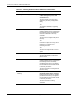
Table 5-5: Front Panel Status LEDs
Item LED Description Status
Front Unit Identification switch status Blue = Activated
OFF = Deactivated
NIC 1 network activity status Green = Network activity
OFF = No activity
NIC 1 network link status Green = Linked to network
OFF = No Link
NIC 2 network activity status Green = Network activity
OFF = No activity
NIC 2 network link status Green = Linked to network
OFF = No Link
Disk drive activity, including the
CD-ROM, DVD-ROM, diskette, and
hot-plug SCSI hard drives
Green = Drive activity
OFF = No drive activity
Power On/Standby status Amber = Standby
Green = ON
OFF = power cord not
attached to the server or
power supply failure