
ProLiant DL360 Server Maintenance and Service Guide




Diagnostics and Troubleshooting
Compaq ProLiant DL360 Server Maintenance and Service Guide 4-71
COMPAQ CONFIDENTIAL Codename: MIcroMachines Part Number: 169616-006 Last Saved On: 12/21/01 9:05 AM
Remote Service Features
Compaq servers have the following management features that you can access through a
modem or a network:
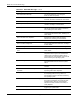
Table 4-23: Compaq Servers Remote Management Features
Feature Description
Service Session Provides remote access to all the utilities on the Compaq system partition,
including Diagnostics utilities, Inspect, ROMPaq, Drive Array Advanced
Diagnostics (DAAD), and the System Configuration Utility. Also provides the
capability for remote file transfer services to and from the Compaq system
partition.
Disk-Based
Diagnostics
Provides remote diagnostic capability after you configure ASR-2 and the reset
restart option to restart from Compaq Utilities. Also allows you to view Health
Logs. Disk-based diagnostics can also be run locally. Press the F10 key during
the restart process when the cursor moves to the upper-right corner of the
monitor.
Server Restart Provides the ability to restart the server remotely from Compaq Insight
Manager while the operating system is running. Allows the server to restart
back to the operating system or restart to the Compaq system partition.
Provides a complete system reset to all peripherals. If you select Boot to
Compaq Utilities from Compaq Insight Manager, Compaq Utilities loads the
appropriate remote services so that remote access is available. If network
status is enabled, network support is loaded. If Dial-In status is enabled, the
modem is set to auto-answer.
Configuration
Utility
Allows you to run the remote System Configuration Utility locally. Press the
F10 key during the restart process when the cursor moves to the upper-right
corner of the monitor.
Firmware Updates Allows you to update the server firmware remotely. Uses firmware images on
the Compaq system partition that might have been previously uploaded with
the file transfer services.
ROMPaq Error Recovery Options
From time to time it may be desirable to upgrade the current system ROM. Some reasons for
this may be as follows:
• Customer requires ROM upgrade
• Obtained new SmartStart CD-ROM
• Desire to upgrade server processors
• Request from Compaq
The process of upgrading the system ROM is referred to as flashing the ROM. Flashing
consists of using software to replace the current ROM image with a new one through
ROMPaq.