
ProLiant DL360 Server Maintenance and Service Guide


Diagnostics and Troubleshooting
4-64 Compaq ProLiant DL360 Server Maintenance and Service Guide
COMPAQ CONFIDENTIAL Codename: MIcroMachines Part Number: 169616-006 Last Saved On: 12/21/01 9:05 AM
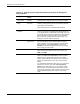
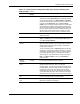
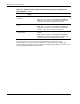
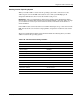
Table 4-19: Compaq System Configuration Utility Paper Settings for Booting into
Compaq Utilities
continued
Pager Data Example
Setting
Description
Network IP
address
xxx.xxx.xxx.xxx Enter the IP address for this server in standard dot notation.
Note: This is not used if you select Custom for Network
controller. You must enter the IP address in the NET.CFG
file that you load into the Compaq system partition.
Network IP net
mask
xxx.xxx.xxx.xxx Enter the net mask for this server in standard dot notation.
Note: This is not used if you select Custom for network
controller. You must enter the IP address in the NET.CFG
file that you load into the Compaq system partition.
Network IP
router address
xxx.xxx.xxx.xxx Enter the router to be used for this server in standard dot
notation.
Note: This is not used if you select Custom for network
controller. You must enter the IP address in the NET.CFG
file that you load into the Compaq system partition.
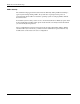
If you configure the server to boot into Compaq Utilities, it prepares for remote
communications. You can remotely run Diagnostics software, the Inspect Utility, or the
System Configuration Utility using a workstation running terminal emulation software, such
as Compaq Insight Manager or PC Anywhere.