
ProLiant DL360 Server Maintenance and Service Guide


Diagnostics and Troubleshooting
4-62 Compaq ProLiant DL360 Server Maintenance and Service Guide
COMPAQ CONFIDENTIAL Codename: MIcroMachines Part Number: 169616-006 Last Saved On: 12/21/01 9:05 AM
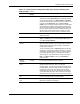
Table 4-19: Compaq System Configuration Utility Paper Settings for Booting into
Compaq Utilities
Pager Data Example
Setting
Description
Pager status Enabled Indicates whether the pager feature is enabled or disabled
Pager dial
string
ATDT
555-5555
Indicates the pager dial string and delay before the pager
message; pagers typically use one of the following formats:
Local pagers: ATDT 555-5555
Wide area pagers: ATDT 1-800-555-5555,1234567#
Pager
message
1234567# Represents a unique number (maximum seven digits,
numeric only) that you must designate to identify the server
on the pager display. The ROM adds a three-digit code to the
front of this number. The first two indicate the subsystem and
the third indicates the severity of the error that caused the
alert. The # symbol usually terminates the message. If no
message is required, delete the # symbol.
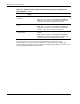
Pager test Select to test
pager setup
Use this to test the current pager settings. Press the Enter
key to dial the pager number, and the pager message (if
present) displays. You must configure the computer before
testing the pager, and the Pager Status must be set to
Enabled. Do not test the pager if you are running remotely
and are using only one modem.
Serial interface COM1 Select the communications port for the modem used by the
pager and the remote ASR-2 functions. The options are
COM1 and COM2.
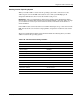
Dial-in status Enabled
Set Dial-In Status to Enabled. Be sure the Reset Boot
option is set to Boot Compaq Utilities. When the system
starts because of an ASR reset, it starts to the Compaq
Utilities, sets the Management Modem to auto-answer, and
waits for the administrator to dial in and run the Compaq
Utilities.
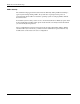
You automatically disable this option when you configure the
software error recovery start option to Boot Operating
System. When ASR pages you, you cannot dial in unless
ASR-2 exceeds 10, the threshold number of server restart
retries. When this happens, ASR-2 restarts the server into the
Compaq Utilities and places the modem in auto-answer
mode.
continued