
ProLiant DL360 Server Maintenance and Service Guide


Diagnostics and Troubleshooting
Compaq ProLiant DL360 Server Maintenance and Service Guide 4-61
COMPAQ CONFIDENTIAL Codename: MIcroMachines Part Number: 169616-006 Last Saved On: 12/21/01 9:05 AM
Booting into Compaq Utilities
When you enable ASR-2 to start into Compaq Utilities and a critical error occurs, the
operating system-specific Health Driver logs the error information in the IML and the ASR-2
feature restarts the server. When the system reinitializes, the system pages the designated
administrator (if enabled), and starts Compaq Utilities from the hard drive.
If Dial-In status is enabled, the modem is placed in auto-answer mode. If you enable Dial-Out
status, you are automatically enabled for Dial-In.
If Network Status is enabled, the appropriate network support software is loaded, depending
on the network protocol, IP or IPX. This allows remote access via the network.
IMPORTANT: Compaq Utilities are loaded from a specially created Compaq system partition on the
hard drive. This partition was configured during server configuration.
You can access the server and view the Integrated Management Logs remotely by modem,
in-band over the network, or directly from the server. For modem access, you must have
either Compaq Insight Manager 2.0 or above or have a VT100 or ANSI terminal type device.
You may use a standard CRT with VT100 or ANSI emulation capability, or you may use a
PC with a VT100 or ANSI terminal emulation package. The communication parameters must
be set for 8 data bits, no parity, and 1 stop bit.
You can also enable ASR-2 to allow network access using the Network Status feature in the
System Configuration Utility. You must have either Compaq Insight Manager 2.0 or greater
or a Novell Virtual Terminal (NVT) emulator on an IPX network to use this feature. You
must also have version 2.24 or later of the System Configuration Utility. For IP access, you
must have Compaq Insight Manager 2.10 or later, or a Telnet Terminal emulator to use this
feature. You also must have version 2.24 or later of the System Configuration Utility.
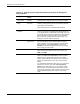
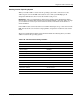
The System Configuration Utility settings should resemble the settings in Table 4-19 when
you enable ASR-2 to start into Compaq Utilities.