
ProLiant DL360 1GHz Upgrade

Compaq ProLiant DL360
Rev. 0.0 5 of 10
Preparing the Server for Installation
1. Back up your server data.
2. Flash the ROM with the most recent ROMPaq. For the most recent
ROMPaq, visit the Compaq website:
http://www.compaq.com/support/files
3. Shut down the operating system as directed in your operating system
instructions.
4. Put the server in standby mode by pressing the Power On/Standby
switch.
5. Disconnect the power cord and peripheral cables.
6. Remove the server from the rack. Refer to the Compaq ProLiant DL360
Setup and Installation Guide or the documentation that shipped with
your rack deployment option.
7. Place the server on a flat, level workspace.
8. Remove the access panel.
Installing the Processor
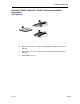
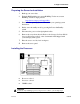
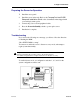
n Processor socket 1
n Processor socket 2
n DIMM socket 1
Important
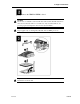
If you are only installing a processor in processor socket 2, you can skip step 2