
ProLiant DL360 1GHz Upgrade

Compaq ProLiant DL360
Rev. 0.0 10 of 10
Preparing the Server for Operation
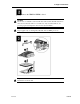
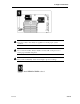
1. Install the access panel.
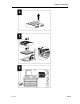
2. Install the server in the rack. Refer to the Compaq ProLiant DL360
Setup and Installation Guide or the documentation that shipped with
your rack deployment option.
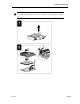
3. Connect the power cord and peripheral cables.
4. Press the Power On/Standby switch to power up the server.
5. Installation is complete.
Troubleshooting
If you receive the following error message, you did not follow the directions
for flashing the ROM:
“Error XXXX: ROM is corrupt”
You must now enable the server’s disaster recovery mode, and attempt to
regain system functionality.
Important
Before performing this operation, refer to the Compaq Servers
Troubleshooting Guide for complete instructions on disaster recovery.
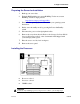
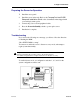
To enable disaster mode, set configuration switches 1, 4, 5, and 6 on the
system configuration switch to on.